How to request international shipping from your Aiyu Japan account
A simple guide to selecting packages from storage, requesting preparation or consolidation, confirming the final weight, choosing a shipping method, and tracking the shipment from your account.
Process overview
The process starts in your storage page. First, select the packages you want to prepare. If you only have one box, select that box. If you have several packages or orders, choose the ones you want to prepare together for consolidation.
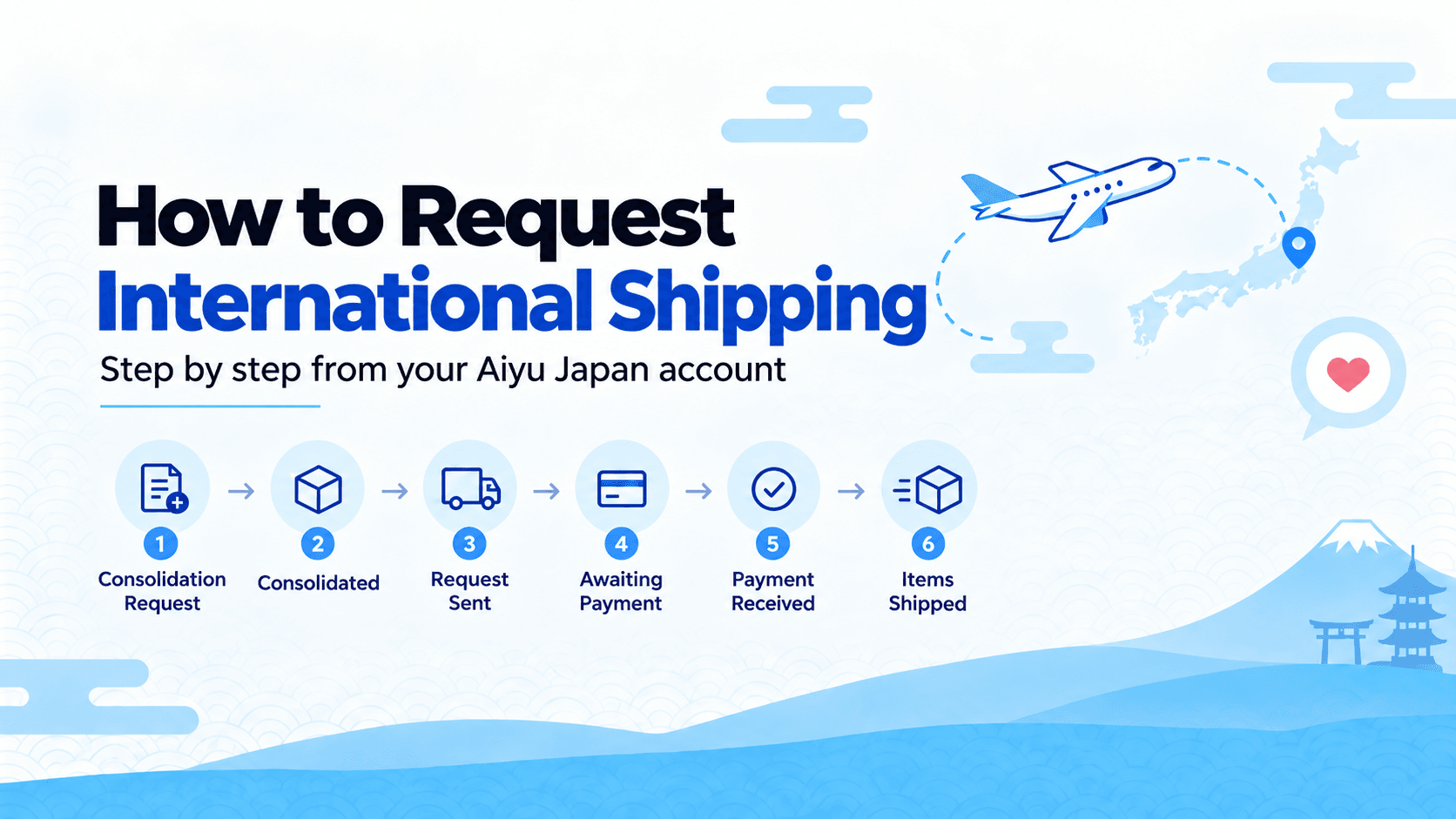
Once our team finishes preparing the package, the status changes to Consolidated. At that point, the final weight is available and you can proceed with the international shipping request, choose an available shipping method, and wait for the invoice.
Steps to request shipping
Go to Storage
Log in to your account and open the storage section to review the packages that have already been received and registered by Aiyu Japan.
Select the packages you want prepared
Choose the packages or boxes you want to ship. If it is a single box, select that box. If there are several packages, select the ones you want prepared together for consolidation.
A consolidation request is created
This request tells our team which packages should be prepared. At this stage, you do not choose the international shipping method yet, because the final package must be prepared first.
Our team prepares the package
Aiyu Japan organizes the selected packages, prepares the final box, and confirms the weight. Once this is done, the shipment appears as Consolidated.
Request international shipping
After the package is consolidated, you can request international shipping and choose your preferred shipping method from the available options.
Wait for the invoice and complete payment
After the request is sent, the invoice is issued. The status will show as Awaiting payment until the payment is confirmed.
Payment received and shipment dispatched
Once payment is received, the package moves to dispatch. It will then update to Items shipped, and tracking information will be available from your account.
What to check before selecting packages
Before requesting preparation or consolidation, make sure the packages you want to ship are already registered correctly in your storage.
Statuses you may see in your account
| Status | What it means |
|---|---|
| Consolidation request | You have selected the packages you want prepared. This step tells our team which boxes or orders should be consolidated or prepared for shipping. |
| Consolidated | Our team has finished preparing the final package. The weight has been confirmed, and the package is ready for an international shipping request. |
| Request sent | The international shipping request has been sent with the selected method, and the invoice will be prepared. |
| Awaiting payment | The invoice is available and the shipment is waiting for payment before it can be dispatched. |
| Payment received | Payment has been confirmed. From this stage, the package moves into the dispatch process. |
| Items shipped | The package has been handed over to the carrier, and the shipment status or tracking information will continue to update on the website. |
Full flow
Request shipping from your storage page
Once your packages are registered, open Storage, select what you want prepared, and follow the process from consolidation to dispatch.