📘 TUTORIAL: How to Use Aiyu Japan
Your Complete Guide to our Shopping Agent & Locker Service
Welcome to Aiyu Japan! Whether you want us to buy items for you or you just need a Japanese address to ship your own purchases, we’ve got you covered. Follow this simple guide to start shopping like a local in Japan.
Section 1: Shopping Agent Service
1. Submit a product request
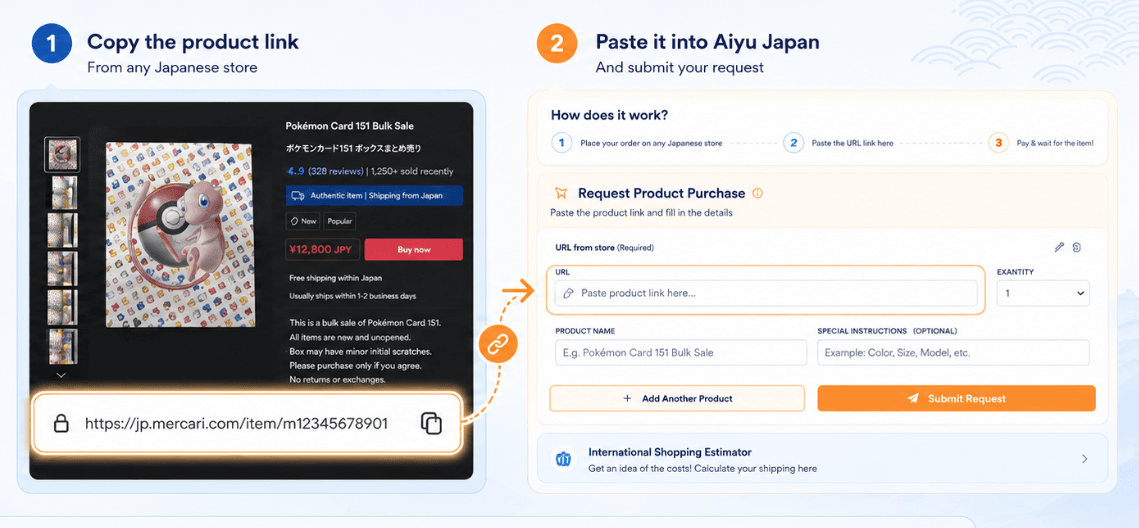
Once you have found an item you love on a Japanese online store, copy the URL (the link) and head to your Aiyu Japan dashboard. Navigate to the "Orders" section to find the "Submit Product Request" form.
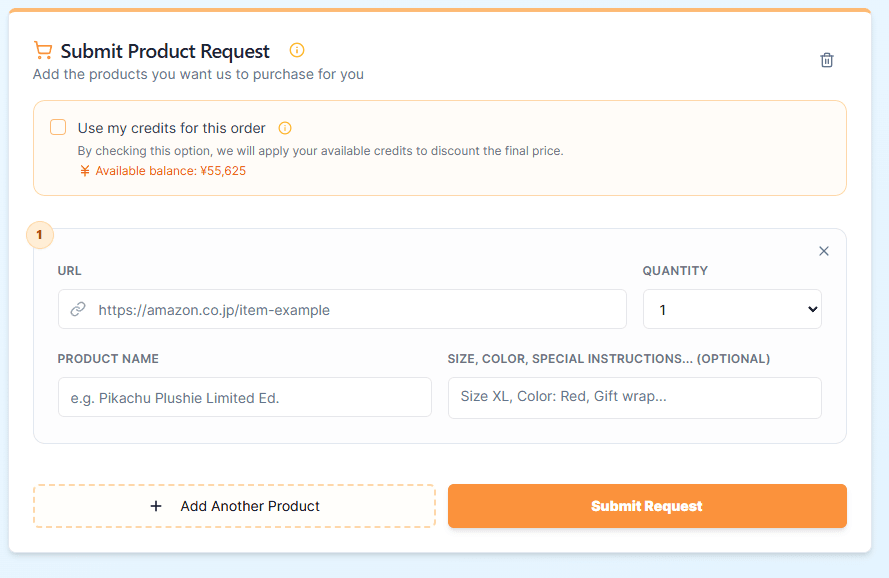
Follow these simple steps to fill out your request correctly:
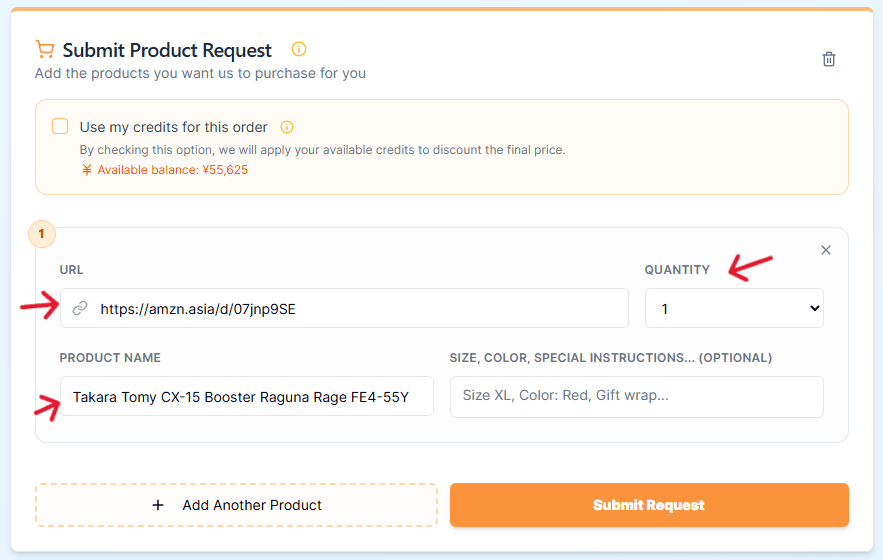
URL: Paste the full web link of the product you found (e.g., from Amazon JP, Mercari, or Rakuten).
QUANTITY: Choose how many units you want to buy using the dropdown menu.
PRODUCT NAME: Type the name of the item. You can use English or the original Japanese name (e.g., Pikachu Plushie Limited Ed.).
SIZE, COLOR, SPECIAL INSTRUCTIONS... (Optional): This field is crucial if the item has variations. If the product has a specific size (XL, M), a color (Red, Blue), or if you have a special request like "Gift wrap," write it here.
Use my credits for this order: If you have an "Available balance" in your account (shown in ¥), check this box. We will automatically apply your credits to discount the final price of your order.
Adding Multiple Items
If you want to buy several different items at once so they can be processed together, click the dashed button: "[+] Add Another Product". A new blank form will appear below for your next item.
1.1. Practical Example: How to Submit a Product Request
Let’s use this Beyblade (Takara Tomy CX-15) from Amazon Japan as an example.
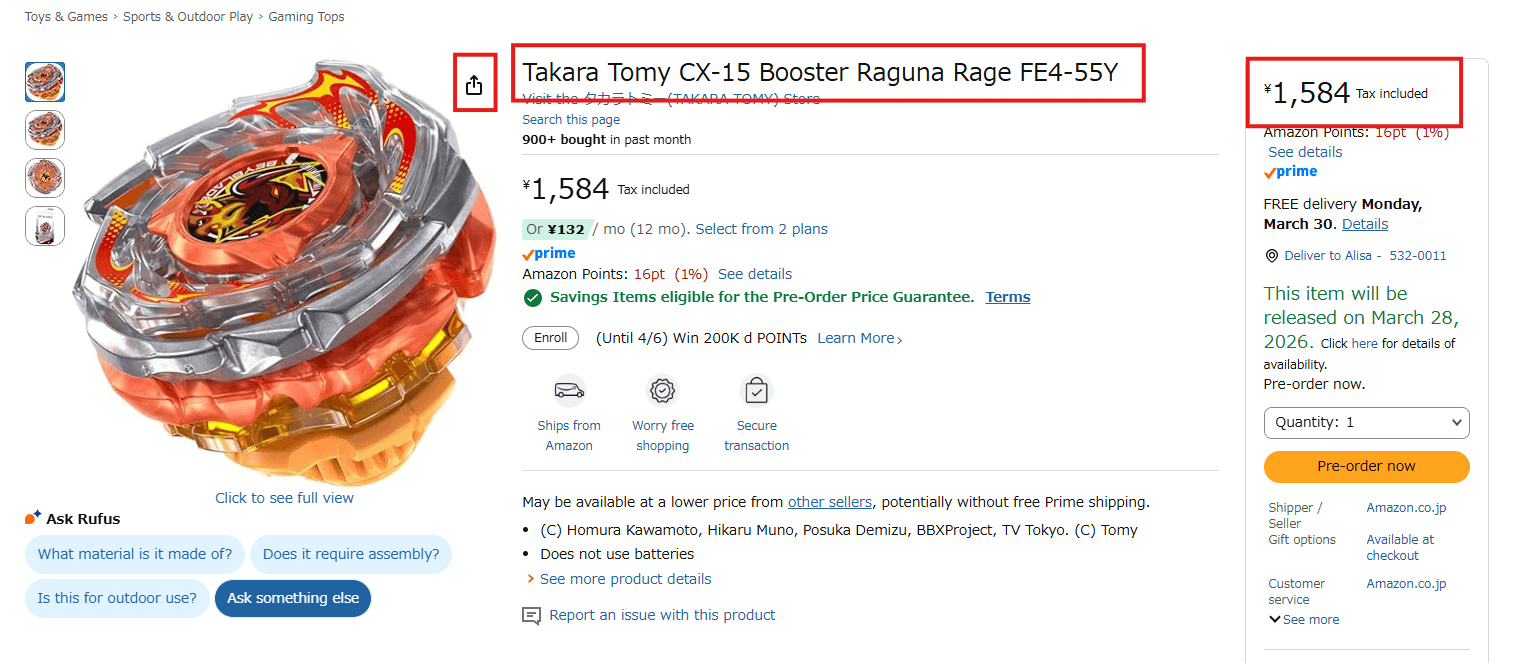
1.1.1. Copy the URL
1.1.2. Paste into the Aiyu Japan Form
Go to your Aiyu Japan dashboard and fill in the fields exactly like this:
URL: Paste the link you just copied from Amazon Japan.
PRODUCT NAME: Copy the title from the store:
Takara Tomy CX-15 Booster Raguna Rage FE4-55Y.QUANTITY: Select
1(or your desired amount).
1.1.3. Add Important Details (Optional)
In the "Size, Color, Special Instructions..." box, you can add extra notes. For this specific item, you could write:
"Pre-order item, release date: March 28, 2026." (This helps our agents know it’s a pre-order).
That’s it! Just click "Submit Request" and we will handle the purchase for you.
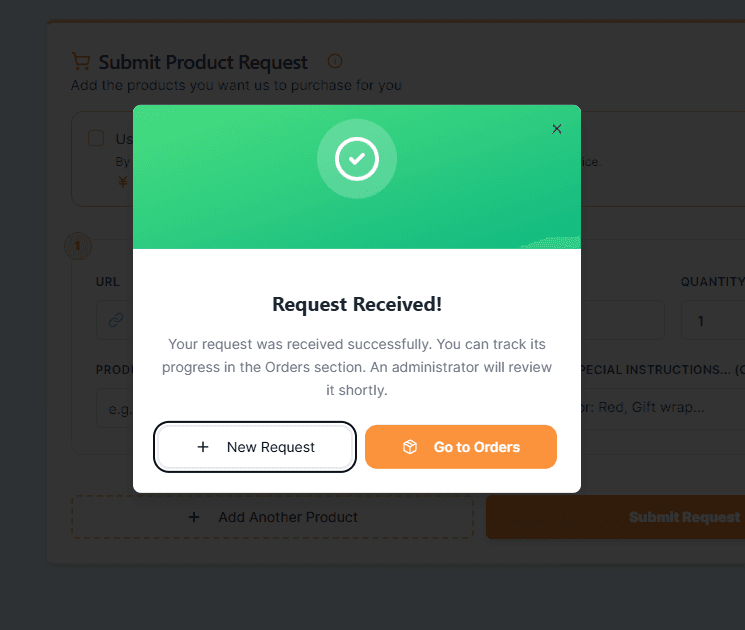
1.2. Submit a different request or go to your orders
Here you will have an option to submit another product request, also be able to check the status of your current order!
Be aware that if you wish to submit two or more products at once, please press "add another product" before pressing "Submit request"
Step 2: Review Your Quote & Pay
Our expert team will manually review your link to confirm availability and calculate the exact final costs.
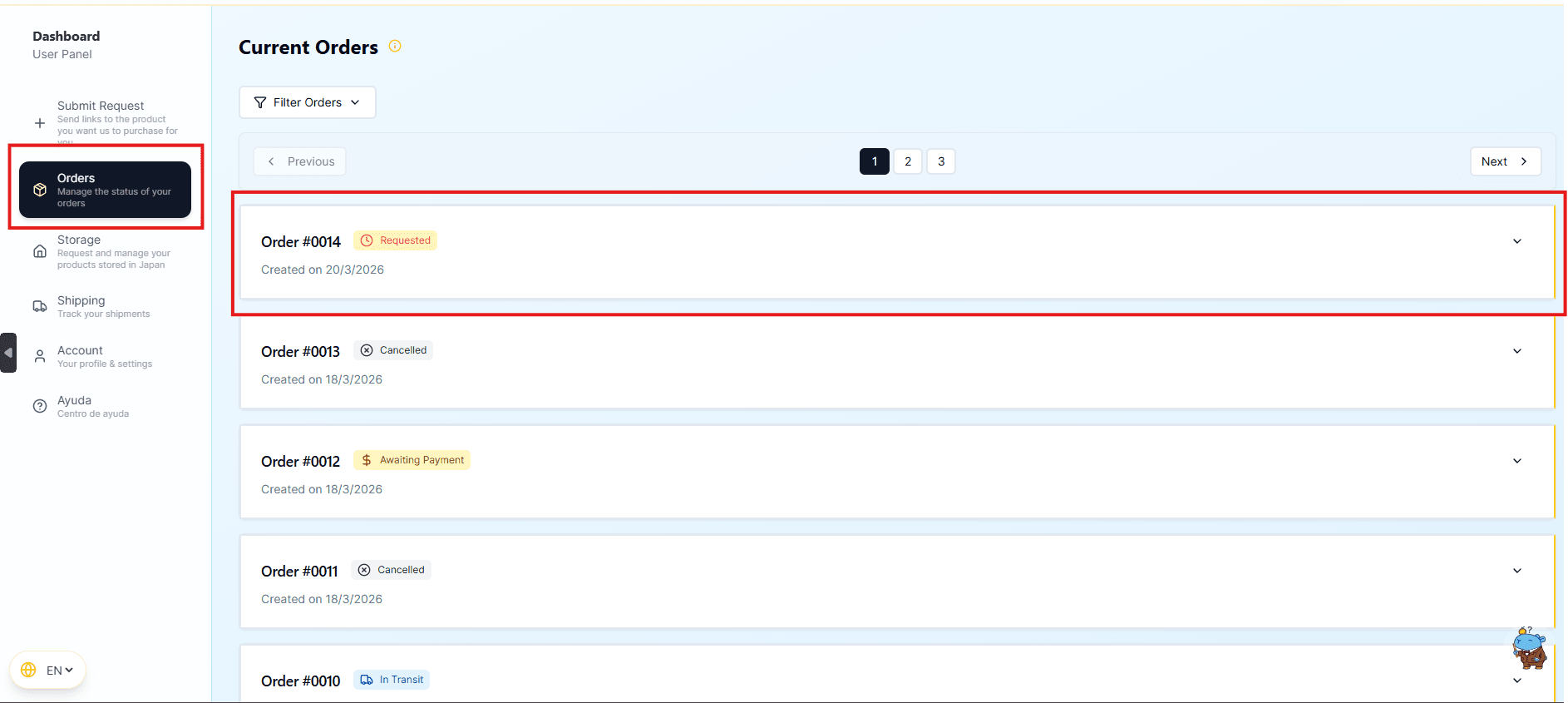
2.1 Wait for the quotation
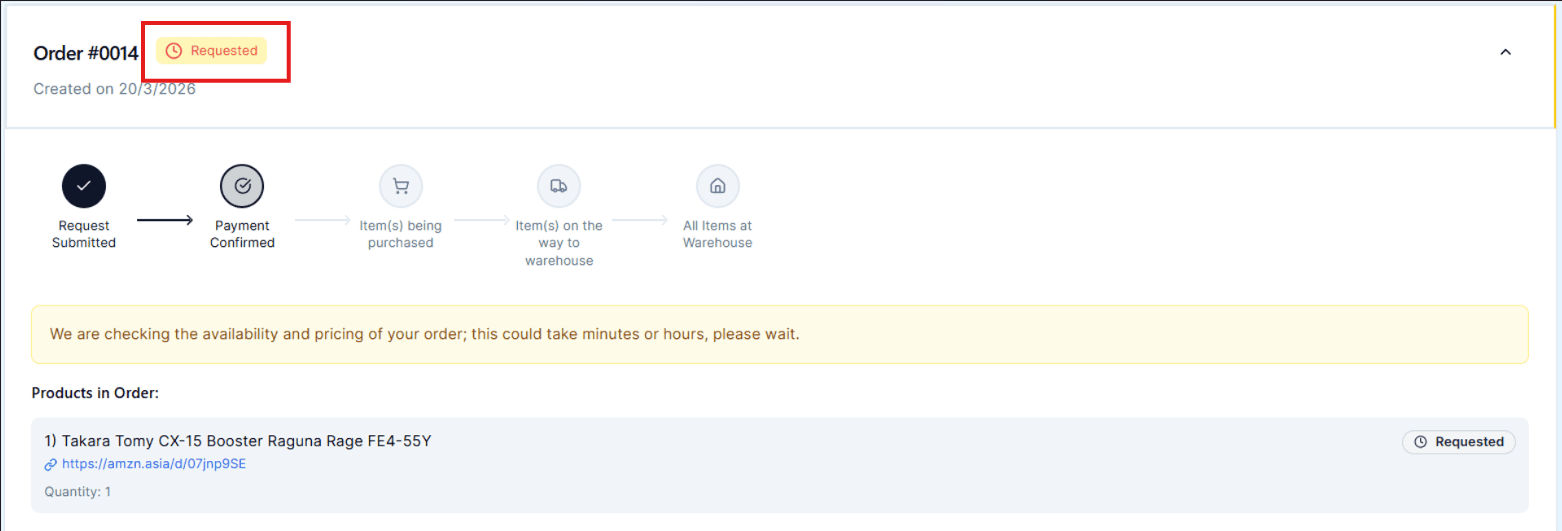
"Requested" Status: In your order list, you will see a yellow "Requested" badge. This means we are currently verifying the price and stock at the Japanese store.
2.2 Make the payment
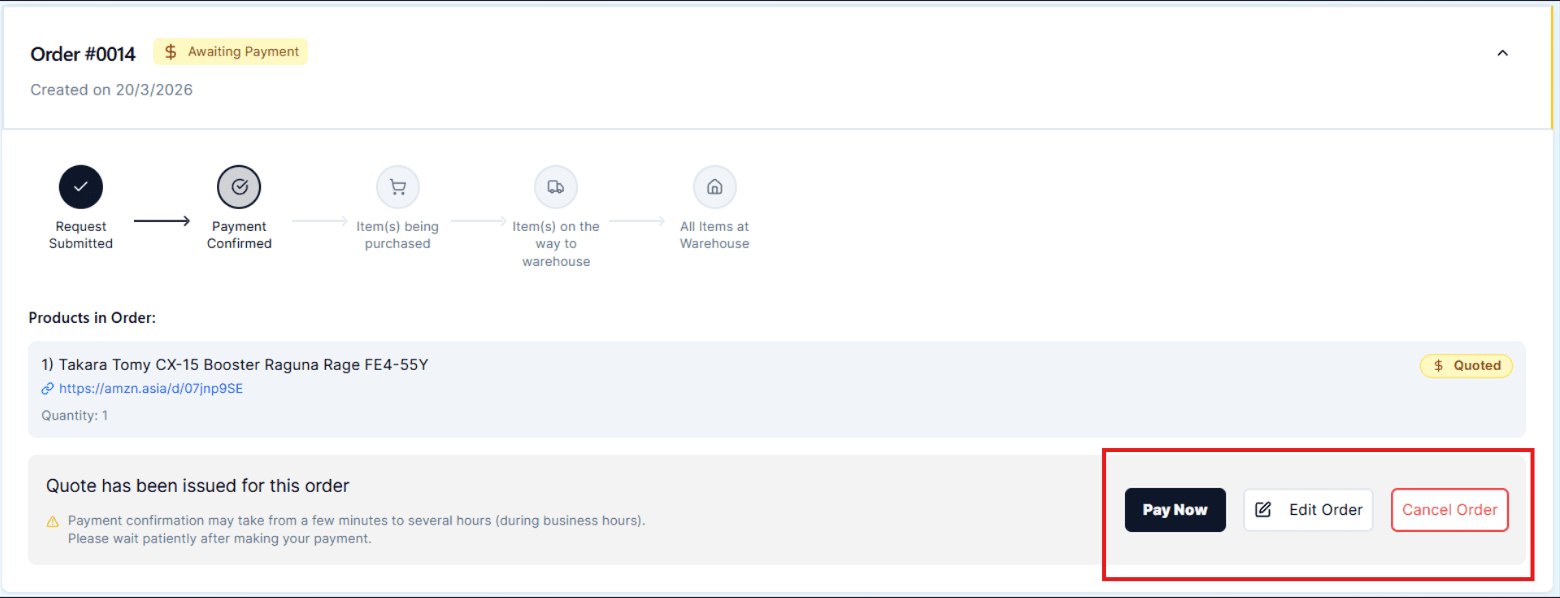
"Awaiting Payment" Status: Once the agent completes the review, the status changes to "Awaiting Payment." You will now see the "Pay Now" button to proceed with the purchase
2.3 Transparent & Secure Payment
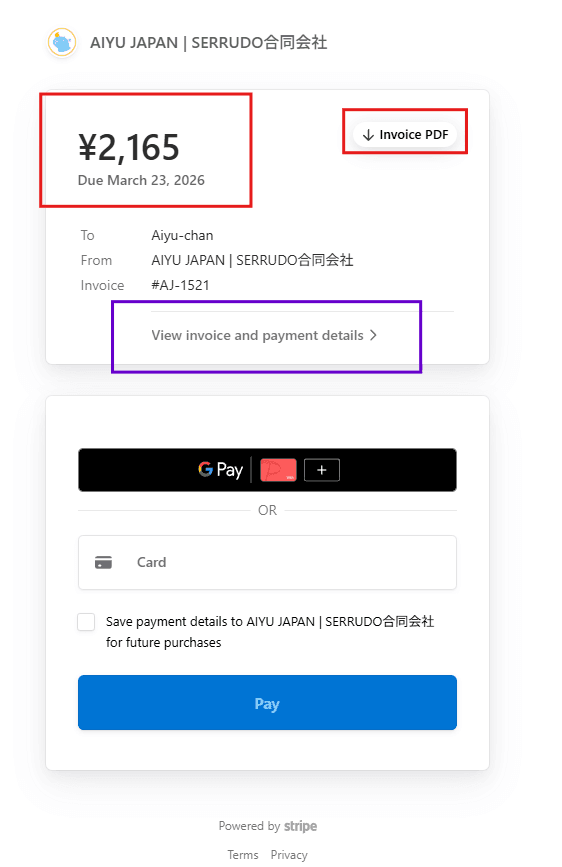
Clicking "Pay Now" opens our secure payment gateway powered by Stripe.
In order to see Invoice detailes breakdown, you must press "View Invoice and payment details"
Detailed Invoice: You will see the total in Japanese Yen (¥). You can download a formal "Invoice PDF" for your records.
Cost Breakdown: Aiyu Japan is 100% transparent. You will see the original product price, our Shopping Agent Fee, and the Payment Processing Fee (not our fee)
Payment Methods: We securely accept Credit Cards, Google Pay, and Apple Pay.
2.4 Purchase & Domestic Transit
Once you pay, we take full control of the logistics!
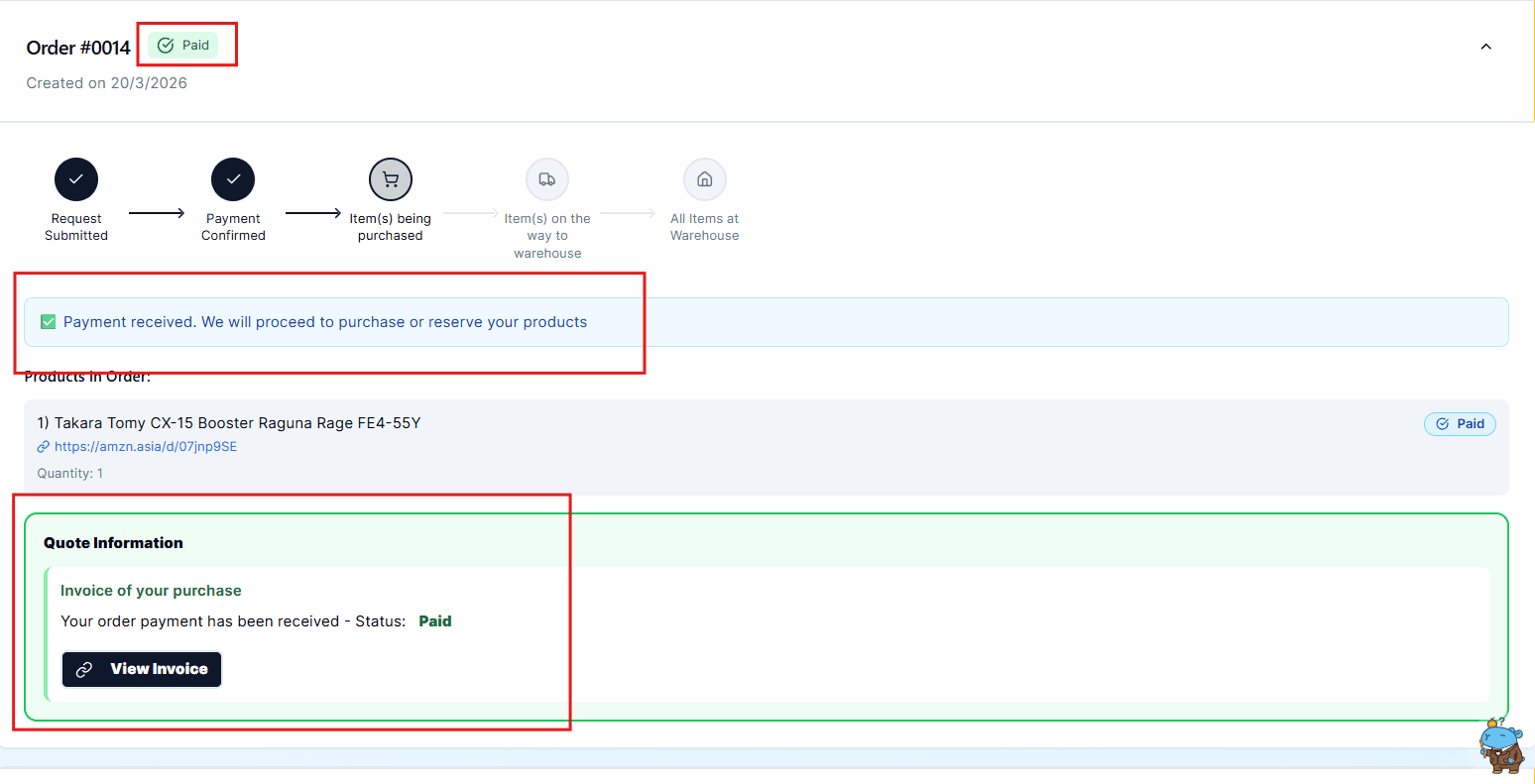
Payment Confirmed: Your order status updates to a green "Paid" badge. Our agents immediately purchase the item directly from the Japanese store.
In Transit: When the store ships the package to our warehouse in Osaka, the status changes to "In Transit." This domestic process usually takes between 3 to 5 business days within Japan (If its a PRE_ORDER product, it may take a while)
3. Package Arrival & Locker Service
Once your package arrives at our warehouse, our team will inspect and register it in your account. You will receive an email confirmation with the updated status.
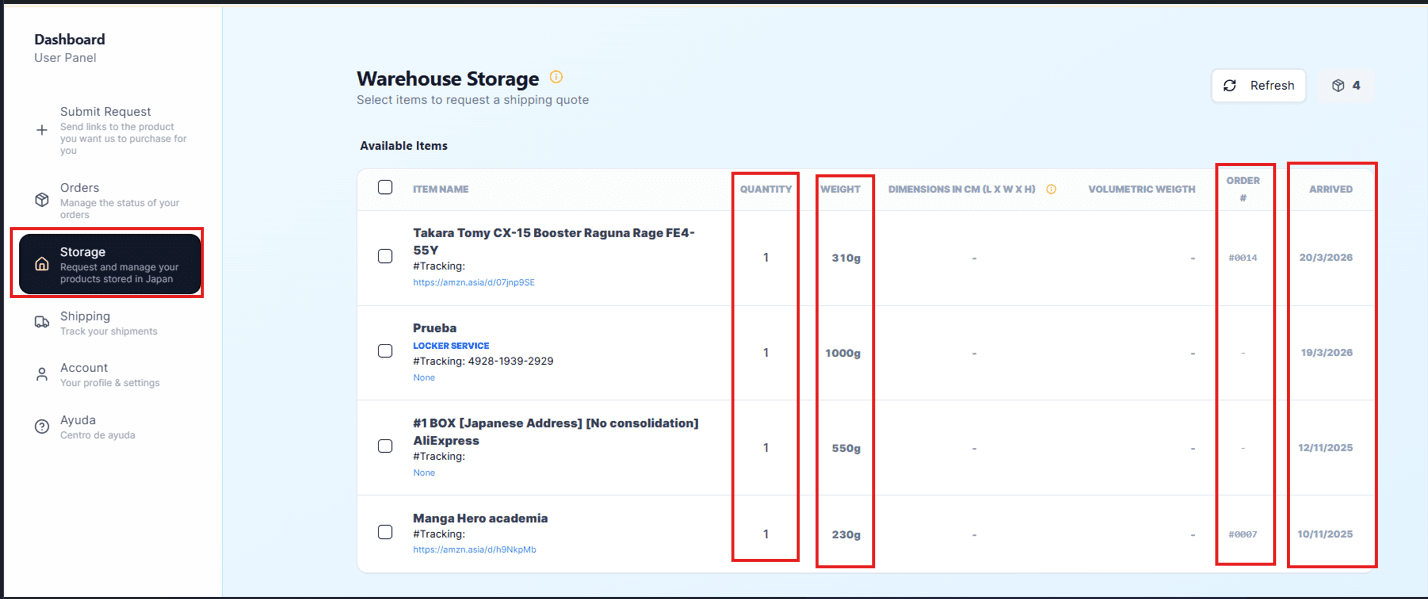
What you will see in your Warehouse Storage
After your items are processed, they will appear in your Warehouse Storage, where you can view:
- Quantity of items
- Package weight
- Box dimensions (upon request)
- Volumetric weight (upon request)
- Order number
- Arrival date
Locker Service – Process Overview
When you send a package to our Warehouse address, you do not need to notify us, when this package arrives, it will be register, and you will automatically receive an email notification including its weight and, if applicable, its dimensions.
Your package will be listed under Locker Service, along with the domestic Japan tracking number for reference.
When do I pay for the Locker Service?
The Locker Service fee is charged only when you request international shipping.
Step 5: Request international shipping
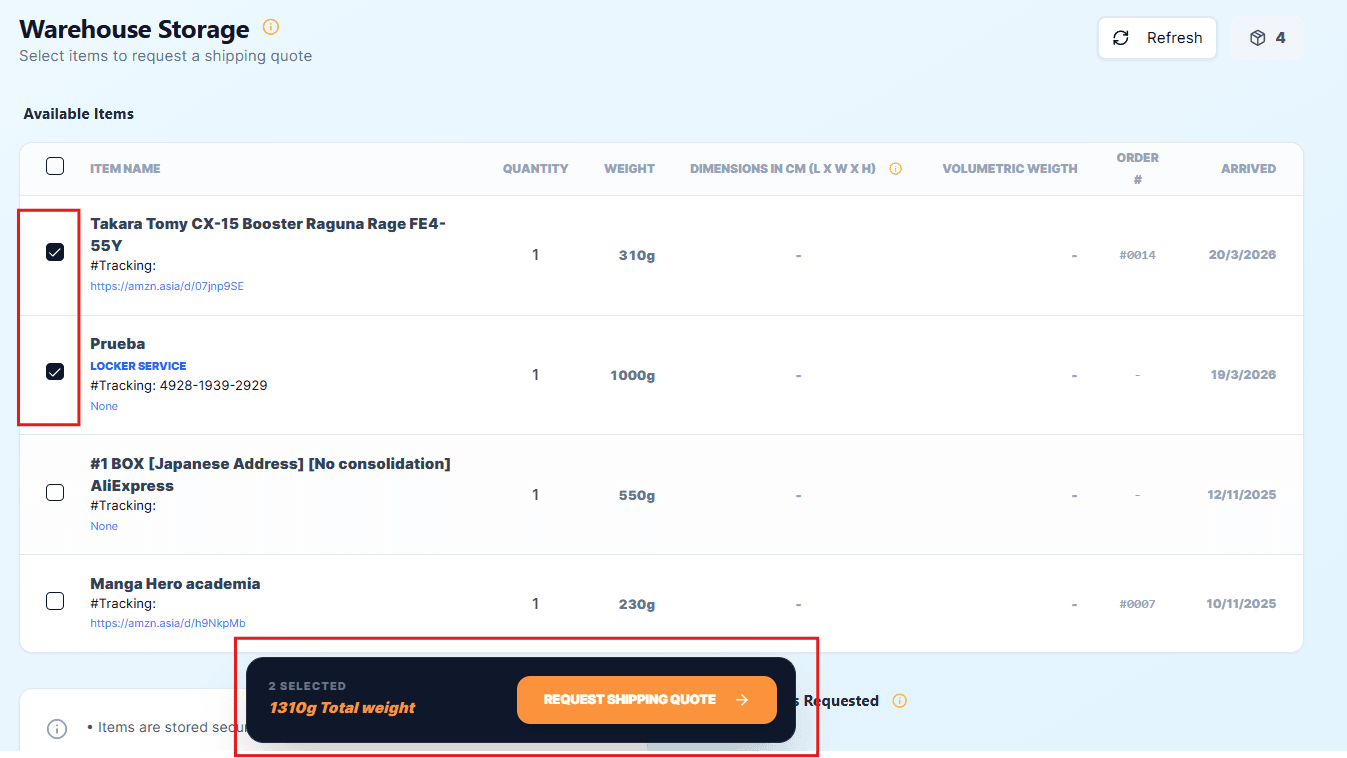
5.1. Select Your Items
Choose the items you want to ship.
The system will automatically display:
- Selected items
- Individual weights
- Total shipment weight
Shipping costs are calculated based on actual weight or volumetric weight (whichever is higher)
5.2. Select Destination Country
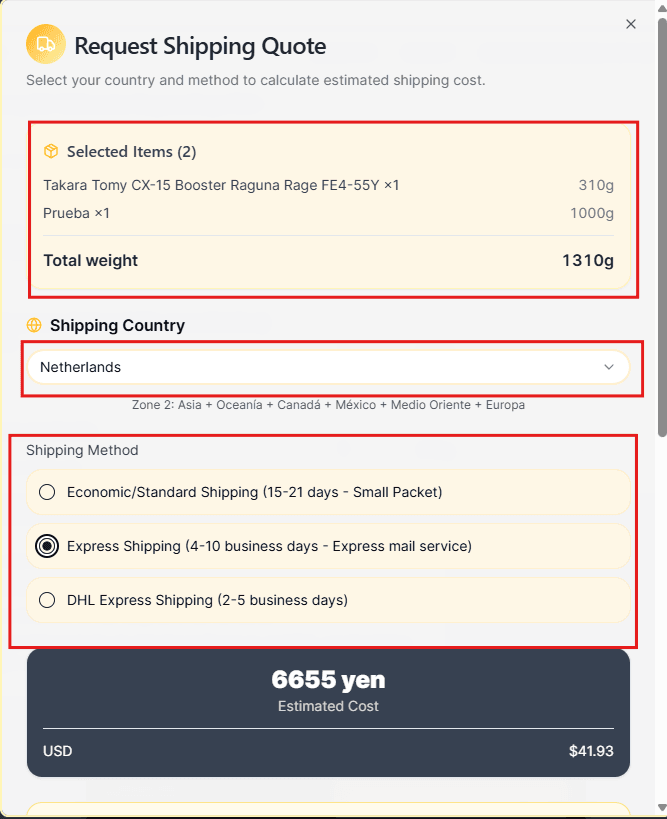
Choose your shipping destination country.
The system will automatically assign the correct shipping zone and available delivery methods.
5.3 Choose Shipping Method
Select the shipping option that best fits your needs:
- Economic / Standard Shipping
→ 15–21 days (Small Packet) - Express Shipping (EMS)
→ 4–10 business days - DHL Express
→ 2–5 business days
Each option will instantly update the estimated shipping cost.
5.4 Review Estimated Cost
You will see the total estimated price in:
- Japanese Yen (¥)
- USD equivalent
This estimate includes international shipping based on your selected method.
5. Optional: Use Credits
If you have available balance in your account, you may:
✔ Apply credits toward your shipment
✔ Reduce the total payable amount
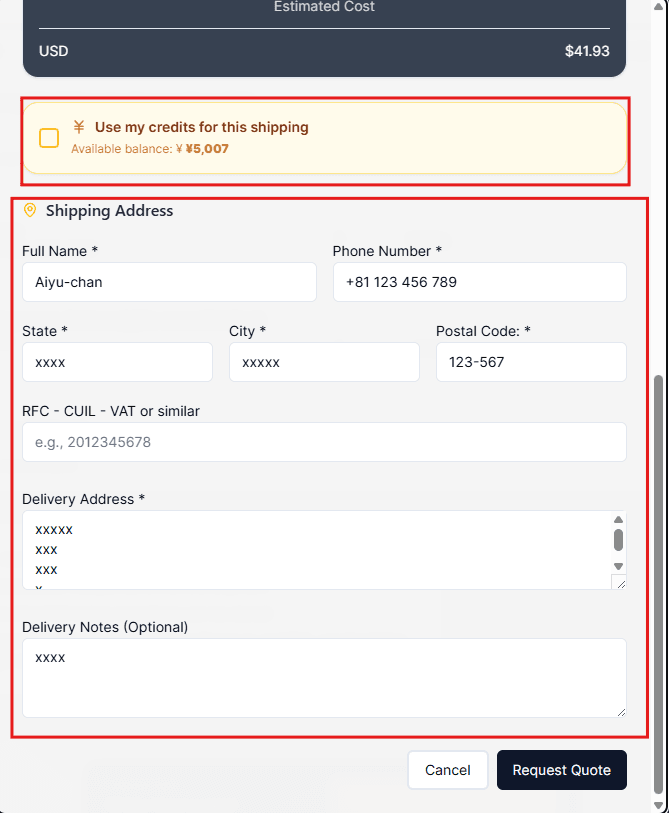
6. Enter Shipping Information
Provide the delivery details:
- Full name
- Phone number
- Address (City, State, Postal Code)
- Tax ID (if required: RFC / VAT / similar)
- Delivery notes (optional)
Be aware that if you choose "DHL" as shipping option, User must provide his/her "Tax ID" for customs clearance.
What Happens Next?
Once submitted:
- Your request is reviewed by the Aiyu Japan team
- A final confirmed quote is generated
- You will be notified when it is ready
Shipment Status Flow
Your order will follow this process:
- Request Submitted
- Awaiting Payment
- Payment Received
- Items Shipped
You can track this progress in your Shipping Dashboard.
Final Step: Sit Back and Let Us Handle the Rest
Once your payment is completed, our team will carefully prepare, pack, and dispatch your shipment from Japan.
From sourcing to delivery, Aiyu Japan manages the entire process to ensure your items arrive safely and efficiently.
You will receive tracking information as soon as your package is shipped, allowing you to monitor its journey until it reaches your doorstep.