User Guide · Forwarding Service
How to Use Your Japanese Forwarding Address with Aiyu Japan
Aiyu Japan’s Forwarding Service is designed for users who want to shop directly from Japanese stores and need a domestic address in Japan to receive their packages.
You can have your purchases delivered to our warehouse in Osaka. Once your package has been received and registered to your account, you can request consolidation, additional services, or international shipping.
Service type
Forwarding service
Receive purchases from Japanese stores at our Osaka warehouse.
Required code
AJ user code
Your AJ user code helps our warehouse team match the package to your account.
Service fee
¥1,000
Applied per package received through the forwarding service.
01 · Service overview
What is Aiyu Japan’s Forwarding Service?
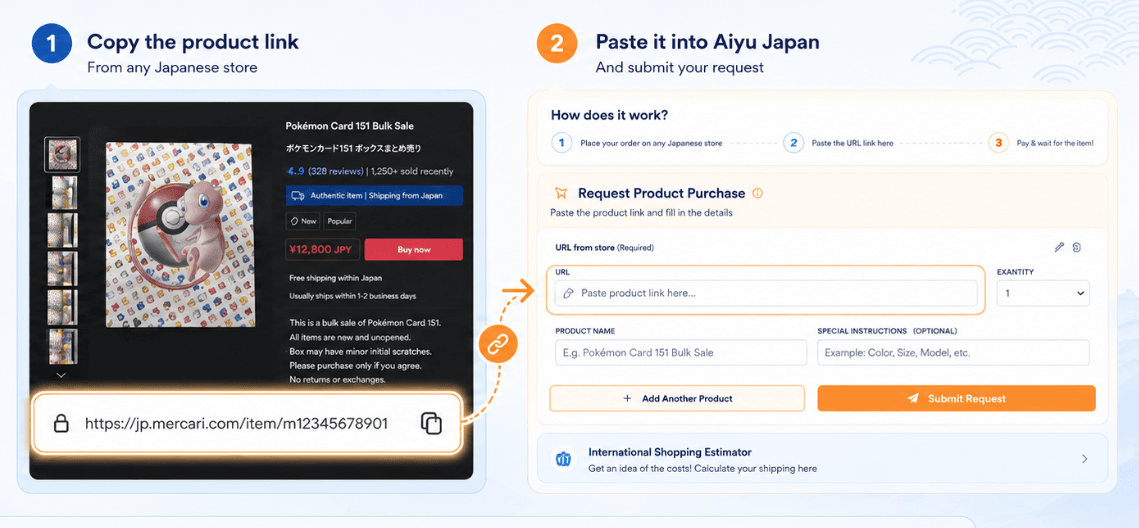
Aiyu Japan’s Forwarding Service allows you to shop directly from Japanese stores and send your purchases to our warehouse in Osaka.
After your package arrives and is registered to your account, you can request additional services, consolidate it with other packages, or ask for an international shipping quotation.
This service is useful when a Japanese store offers domestic shipping within Japan but does not ship directly to your country.
02 · Where to find it
Where can I find my forwarding address?
Your assigned Japanese forwarding address is available inside your Aiyu Japan user dashboard after creating an account.
This address includes the information a Japanese store needs to ship your purchase within Japan.
Copy the address exactly as it appears in your account. We do not recommend translating, modifying, or removing any part of the address, as this may cause delivery issues or delays during package registration.
03 · Most important detail
The most important detail: your AJ user code
In addition to the warehouse address, you must always include your AJ user code.
Code format example
AJ00***
Your AJ user code helps our warehouse team match the package to your account.
If a package arrives without this code or with incomplete information, processing may take longer because our team will need to manually confirm which account the package belongs to.
04 · Store checkout
How to enter your forwarding address at checkout
When shopping directly from a Japanese store, you will need to enter your Aiyu Japan forwarding address in the shipping form during checkout.
Each store may display the address fields differently, but most forms include fields such as recipient name, postal code, prefecture, city, street address, phone number, and an additional section for apartment, building, company, or notes.
The most important point is to copy the address exactly as it appears in your account and always include your AJ user code so we can identify your package when it arrives at the warehouse.
05 · Common fields
Common checkout fields
When entering your forwarding address in a Japanese store, carefully check each field before confirming your order.
Recipient name
Your name or the name shown in your Aiyu Japan account.
Postal code
The postal code shown in your assigned forwarding address.
Prefecture
The prefecture shown in your forwarding address.
City
The city shown in your forwarding address.
Address line
The warehouse address provided by Aiyu Japan.
Apartment / Company / Address line 2
Your AJ user code, if the store allows you to enter it here.
Phone number
The phone number shown in your forwarding address.
Remarks / Notes
You may enter your AJ user code here if no other field is available.
06 · AJ code placement
Where should I place my AJ user code?
Your AJ user code must be visible in the shipping information. Depending on the store’s checkout form, you may place it in fields such as:
The key point is that your AJ user code must appear on the package label or shipping information. If the store does not allow notes or extra information, carefully review the form before confirming your purchase.
07 · Warehouse process
What happens when the package arrives at the warehouse?
When your package arrives at the Aiyu Japan warehouse, our team needs to receive it, identify it, and register it to the correct account.
After registration, the package will appear in your user dashboard. From there, you can request additional services, consolidate it with other packages, or ask for an international shipping quotation.
Package arrives
Team identifies it
Registered to your account
Visible in dashboard
If the store tracking shows “delivered,” please note that this does not always mean the package has already been registered to your account. It must first be processed by our warehouse team.
08 · Service fee
Aiyu Japan Forwarding Service fee
Aiyu Japan’s Forwarding Service has the following fee:
Service fee
¥1,000 per received package
If a store splits one purchase into multiple shipments, each received package will be registered separately and the corresponding fee will apply to each box or package.
This fee covers the registration and handling of each package received through the forwarding service.
09 · Before buying
Important recommendations
Copy your Japanese forwarding address exactly as it appears in your Aiyu Japan account.
Do not translate, modify, or remove any part of the address.
Always include your AJ user code in a visible field during checkout.
Before confirming the purchase, check that the store can ship within Japan.
Review all address details carefully before completing your order.
10 · Final reminder
Use your forwarding address correctly
Using your forwarding address correctly is essential so your packages can be identified and registered without issues.
Always copy the address exactly as it appears in your account and include your AJ user code during checkout at the Japanese store.
Once the package arrives at our Osaka warehouse and is registered, you will be able to request consolidation, additional services, or international shipping from your dashboard.
Ready to use your forwarding address?
View and copy your Japanese forwarding address from your dashboard
Log in to your Aiyu Japan account to check your assigned forwarding address, confirm your AJ user code, and manage packages received at our Osaka warehouse.