First Time Guide
What information you should send
Everything you need to know to start buying authentic Japanese products with Aiyu Japan
Before buying · Sections 4 to 9
Before buying
How to request a product, what details to send, what it costs and how to pay.
04
How to request a purchase
Step 1
Copy the product link
Open the product in the Japanese store and copy the page address. On your phone: Share button → Copy link.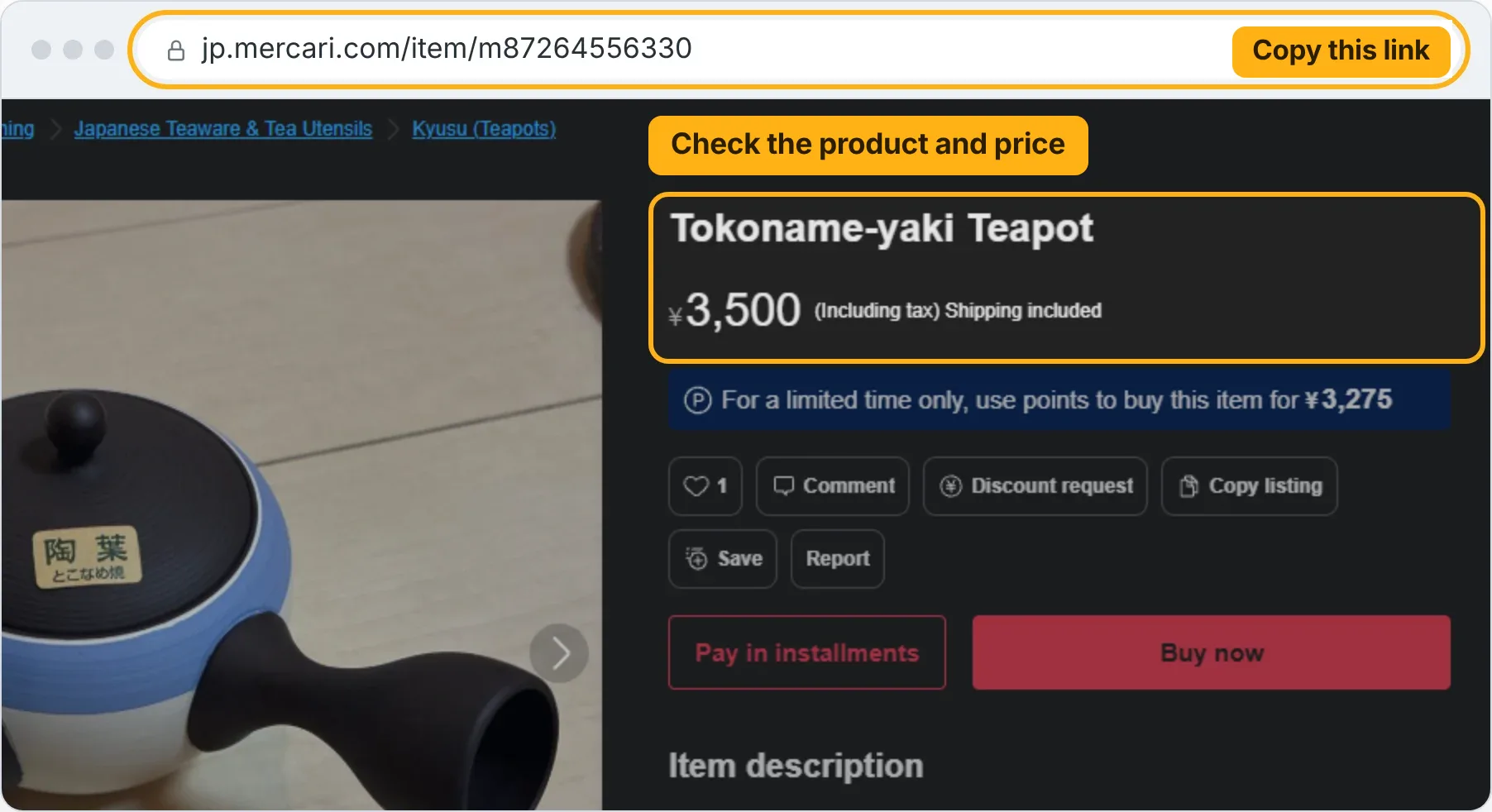
Step 2
Paste it into your account and tap “Add”
Go to Send links, paste the link and tap “Add”. We check the title, price and availability.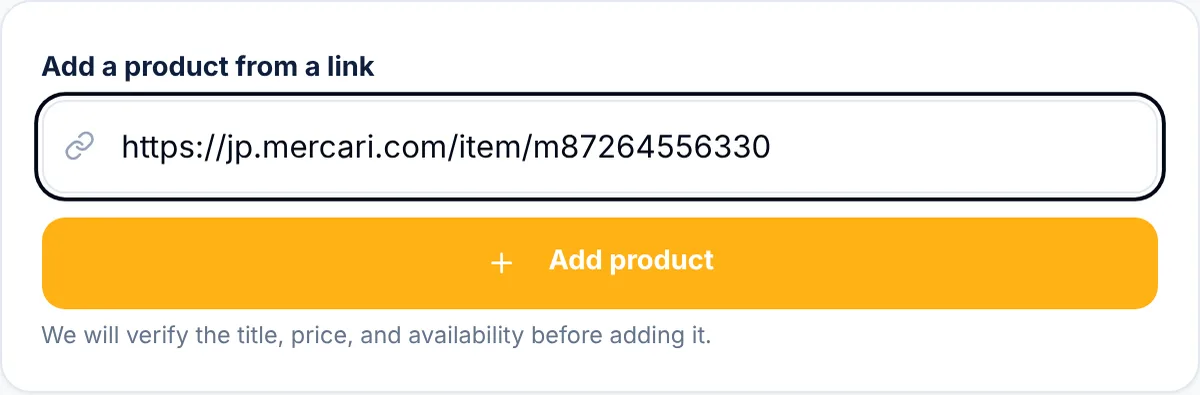
Step 3
Check the item and choose the quantity
If the product has a size, colour or model, write it in “Special instructions”.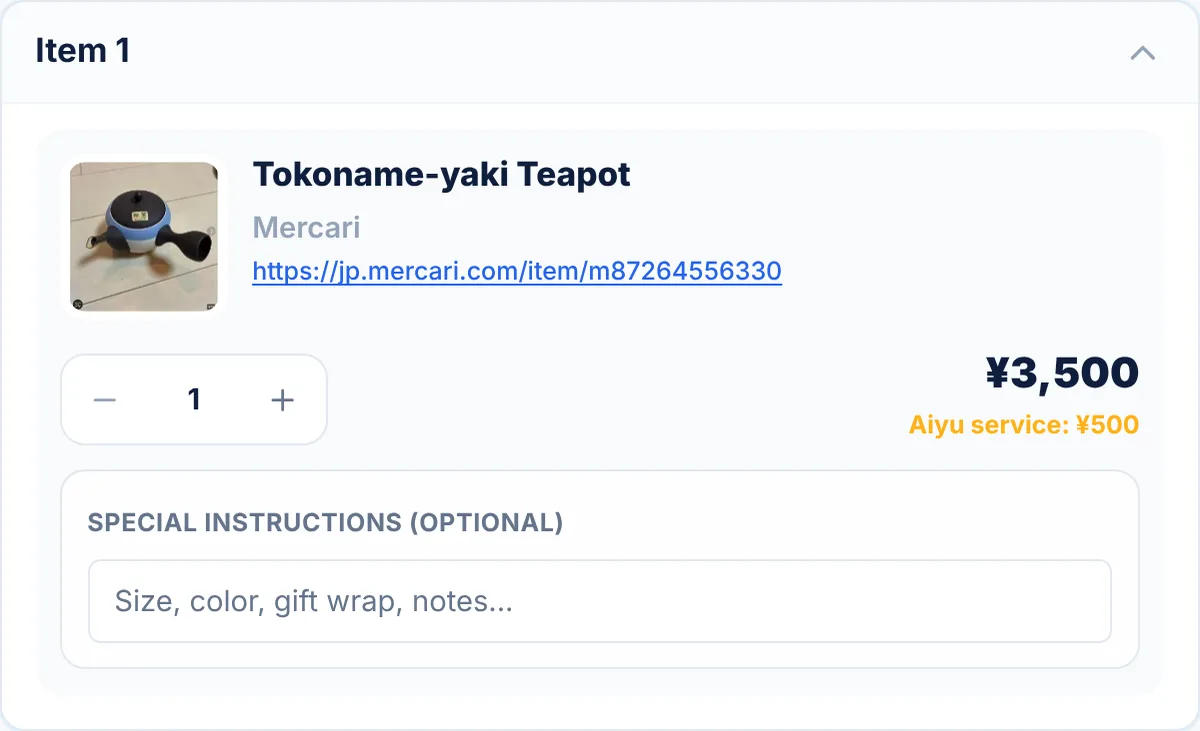
Step 4
Pay or send the request
It depends on the store:Pay right away
Mercari, Yahoo! Shopping, Rakuten, Yahoo! Flea Market, UNIQLO
You see the total right away: product + ¥500 Aiyu service + payment processing. You pay and we buy.With a quote
Other stores (Suruga-ya, AmiAmi, Mandarake…)
Fill in the product name and tap “Send request”. Nothing is charged yet: we let you know when the quote is ready.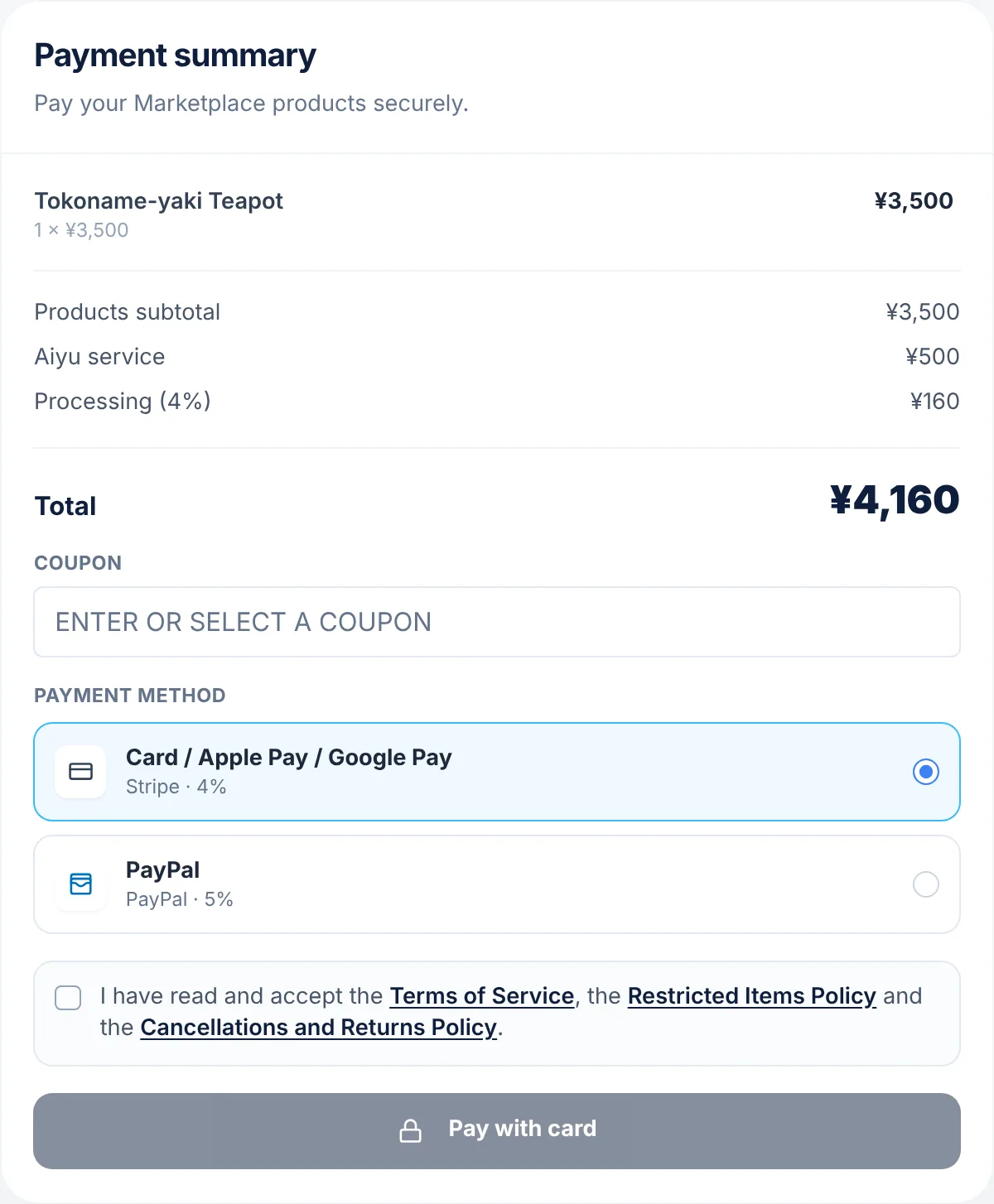
Pay right away: the total includes everything before you pay. 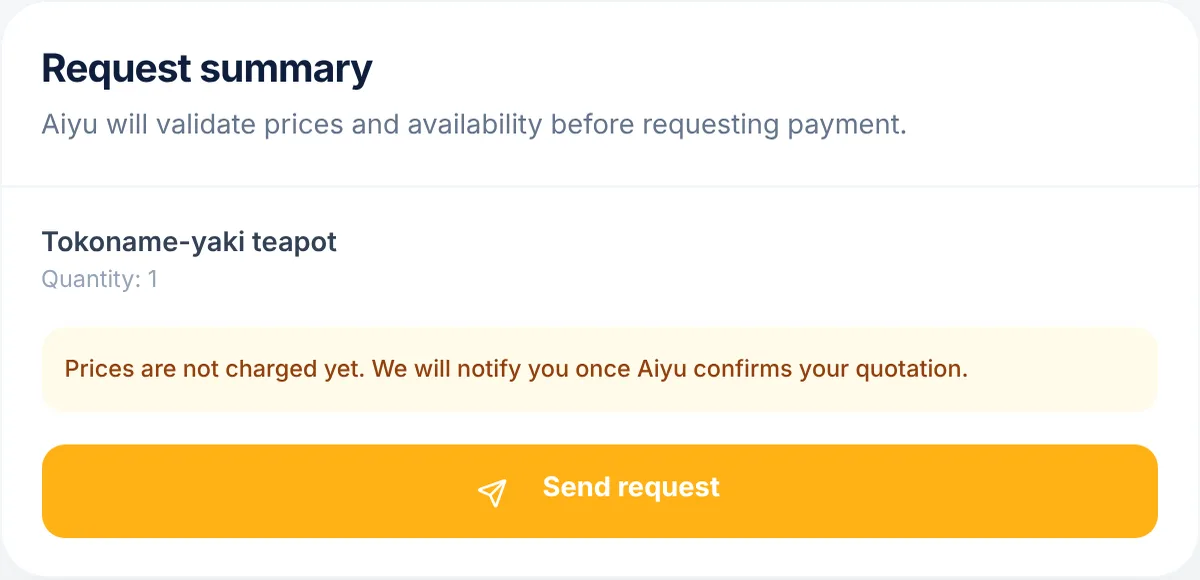
With a quote: you send the request without paying. Step 5
Pay the quote (other stores only)
You'll find it in Orders. It includes the product, domestic shipping in Japan if the seller charges it, the Aiyu service and payment processing.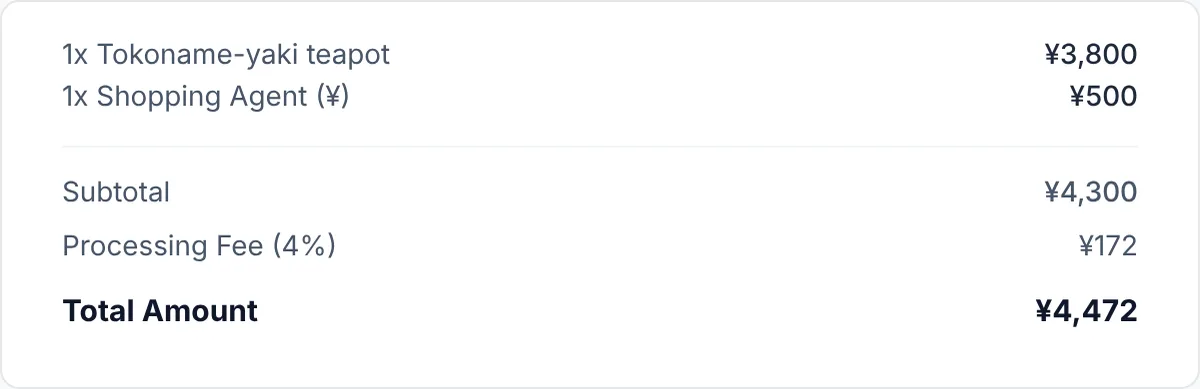
Step 6
We buy it and receive it in Osaka
Follow each step in Orders. When it reaches our warehouse it appears in Storage, and from there you ship it to your country.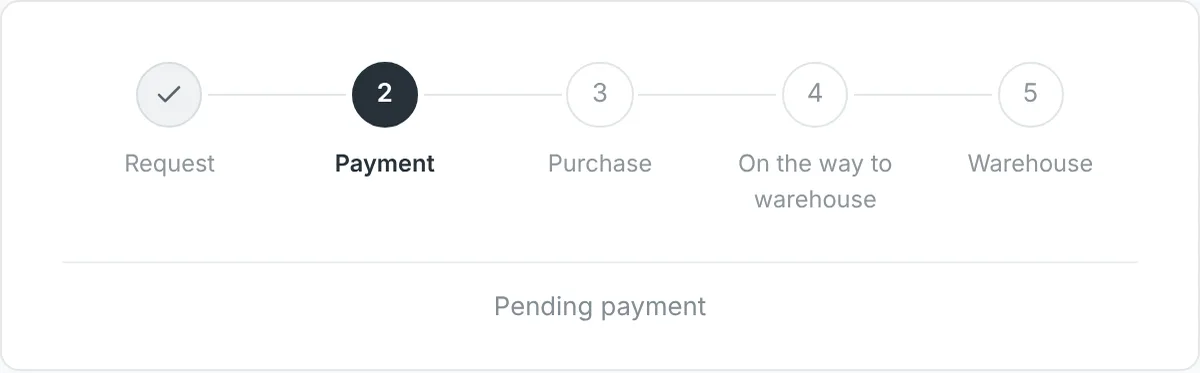
Good to know
- Broken or sold-out link
- We reject the request and let you know by email.
- Several options
- State the size, colour or model so we don't buy the wrong one.
- Number of items
- You can add several products in the same request.
- If we make a mistake
- If we buy something different from what you asked for, we fix it.
Related conditions
05
What information to send
- Product link
- Required. The full page address. Screenshots are not accepted.
- Quantity
- Required. The exact number of units you want.
- Product name
- Other stores only, so you can recognise it in your account. For Mercari, Yahoo! Shopping, Rakuten, Yahoo! Flea Market, UNIQLO it's filled in automatically.
- Size, colour or model
- If the product has options. Write it in “Special instructions”.
- Instructions
- Optional. Any condition for the purchase.
Examples of clear instructions
- “Size XL, black.”
- “Buy only if new with a sealed box.”
- “If the seller raises the price, don't buy.”
06
Fees and costs
Moment 1
When buying
- Product price
- Domestic shipping in Japan, if the seller charges it (usually ¥200–¥1,250)
- Aiyu service: ¥500 per item
- Payment processing
Moment 2
When shipping to your country
- International shipping by box weight and size
- Optional services you request (protection, photos…)
- Payment processing
- Your country's taxes, if they apply
Aiyu Japan fees
Purchase service
Per item, whatever its price.
¥500
Forwarding
Per package you buy yourself and send to our address.
¥1,000
Storage
No general time limit.
Free
Consolidation
We combine your packages into one box.
Free
Late charge
Only if you don't pay for shipping 10 days after consolidation.
from ¥300/week
Payment processing
Card 4%, PayPal 5%. With Aiyu balance, no processing.
4 % · 5 %
Example
A ¥3,800 teapot paid by card
- Product
- ¥3,800
- Aiyu service
- ¥500
- Processing (4%)
- ¥172
- Purchase total
- ¥4,472
International shipping is paid later, when the box is ready.
Related conditions
07
Payment methods
Card, Apple Pay and Google Pay
Visa, Mastercard and AMEX, via Stripe.
4 %
PayPal
With your PayPal balance or linked card.
5 %
Aiyu Japan balance
Top up once and pay purchases and shipping with no processing.
No fee
Bank transfer
Write to support@aiyujapan.com before paying.
By arrangement
- We don't accept Wise or cryptocurrencies.
- If the product sells out before we buy it, we refund the amount to your balance.
Related conditions
08
Balance, credits and coupons
- Balance
- Money you top up yourself (from ¥1,000). Processing is charged when you top up; after that, paying with balance has no fee. On request, we refund it to your card or PayPal with approval, minus processing (4–5%).
- Credits
- You earn them through Aiyunboxing, referrals or compensations. They don't expire and work for purchases and shipping. They can't be withdrawn as cash.
- Coupons
- Discounts for purchases, shipping or both. Each one shows its minimum and expiry. One per payment, unless it says it can be combined.
Related conditions
09
Shipping calculator
- What you enter
- Destination country, approximate weight and size.
- What you get
- The estimated price of each shipping method available for your country.
- Reference weights
- Manga ~180 g · video game ~120 g · boxed figure 400 g–1 kg.